Client Runtime Optimizations
Command Runner 1.1.1 — Resilience pass
A small follow up release focused on making the plugin more resilient during studio tests. And subsequent yielding handling.
Loading commands no longer freezes the plugin
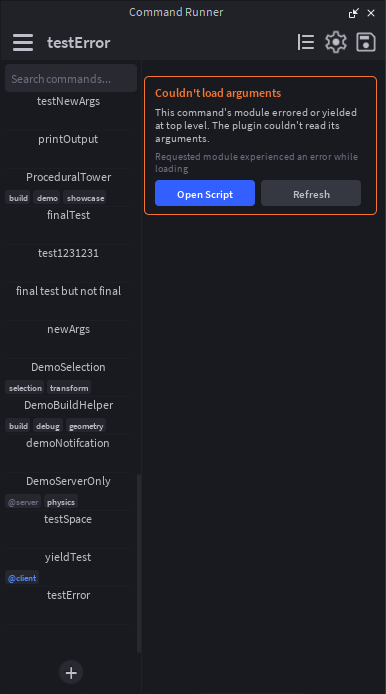
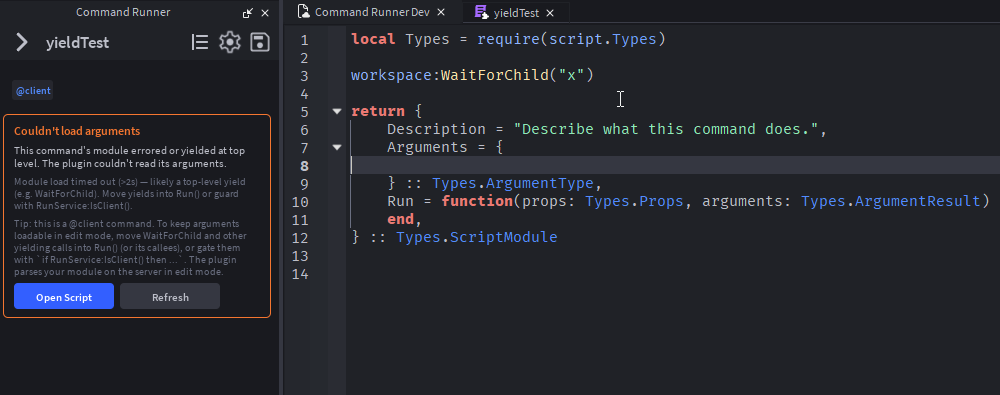
Up until now, a command module that yielded at the top level (WaitForChild, an unfinished task.wait, a blocking :GetAsync, etc.) would silently hang the plugin while it tried to parse the arguments. The plugin now wraps that load in a configurable timeout (default 2 seconds) and bails out cleanly if a module doesn't return in time.
When that happens you now get a banner inside the argument panel instead of a frozen widget, with a warning message letting you know what happened and a Open Script and Refresh button. For commands tagged @client, the banner also explains the fix: move yielding calls into Run() (or its callees), or guard them with if RunService:IsClient() then ..., since the plugin parses your module on the server normally while in studio.
New setting: Require timeout
In Settings, you'll find a new Require timeout (seconds ranging 0.5 to 30s) field, for tuning that bailout. Bump it up if you have heavy init code, drop it down for faster recovery from accidentally-yielding modules.
Creating commands during play test
Previously, hitting + in the sidebar while a play test was running throwing attempt to index nil with 'GetPropertyChangedSignal'. The plugin runs as a client during play test, so ServerStorage isn't reachable and the script never got created.
Now: new commands made during play test land in ReplicatedStorage.CommandRunnerRuntime and are auto-tagged @client. They show up in the sidebar normally, and if you have script saving when stopping play test, they persist as @client-routed commands in edit mode.
Smaller fixes
- Settings popup now scrolls. With the new Require timeout row + the editable template row, content was overflowing the popup; the scroll area now fills the space between the title and Close, with a thinner scrollbar that no longer overlaps controls.
- Run errors toast instead of just warning. When a command throws on require, you now get a notification with the clipped error message, not just a silent
warnin Output.
Files
Get CommandRunner
CommandRunner
Roblox Studio Plugin: Command Bar snippets, upgraded with forms, presets, arguments, and undo.
| Status | Released |
| Category | Tool |
| Author | Gvistic |
| Tags | developer-tools, lua, luau, plugin, productivity, roblox, roblox-studio, studio-plugin, tools, utility |
Leave a comment
Log in with itch.io to leave a comment.